

Kiril Gantchev
📅 Announced 30 October 2026
📍 For offices and sites running an Ameru bin
🤝 Available now, on request from the Ameru sales team
You already have recycling bins and a landfill bin in your office, but auditing your waste is a huge pain. That's not because you're scared to get your hands dirty but running a structured waste audit is time-consuming and difficult. You know that people put the wrong things in them all the time, and you usually don't find out until the hauler complains and the bill shows it. Ameru Waste Audit tells you what's actually going on. Carry a load of your office's waste over to your Ameru bin, pick the stream it's supposed to belong to, and feed it in one item at a time. Once you've been through every stream, the app shows you what was really in there, not what the label on the bin claimed.
🎯 The Problem
Offices rarely find out that their sorting has slipped until the bill arrives. Haulers set a contamination limit: the share of non-recyclable material they will accept in a recycling load before rejecting it outright. Go over that limit and the whole load is refused and billed as residual, the same rate as general waste, including the paper and glass that were sorted correctly. The site is left with a number it cannot act on.
Someone then has to find out what went wrong. The usual answer is a manual audit: a person stands in the loading area for a day, hand-sorting rubbish into buckets and tallying it on a clipboard. It works, but it is slow and expensive, and by the time the tally exists, the load it describes is long gone. One afternoon of measuring, recording, analyzing, and the next quarter is still billed on the old behaviour.
💡 The App
Ameru Waste Audit uses your own Ameru bin to weigh and classify waste you feed it by hand. It is a desktop app for macOS and Windows that runs on your own machine, on your own network, and talks to your bin directly. The bin weighs and classifies each item using the exact same process it runs on normal foot traffic — you are just handing it test material instead.
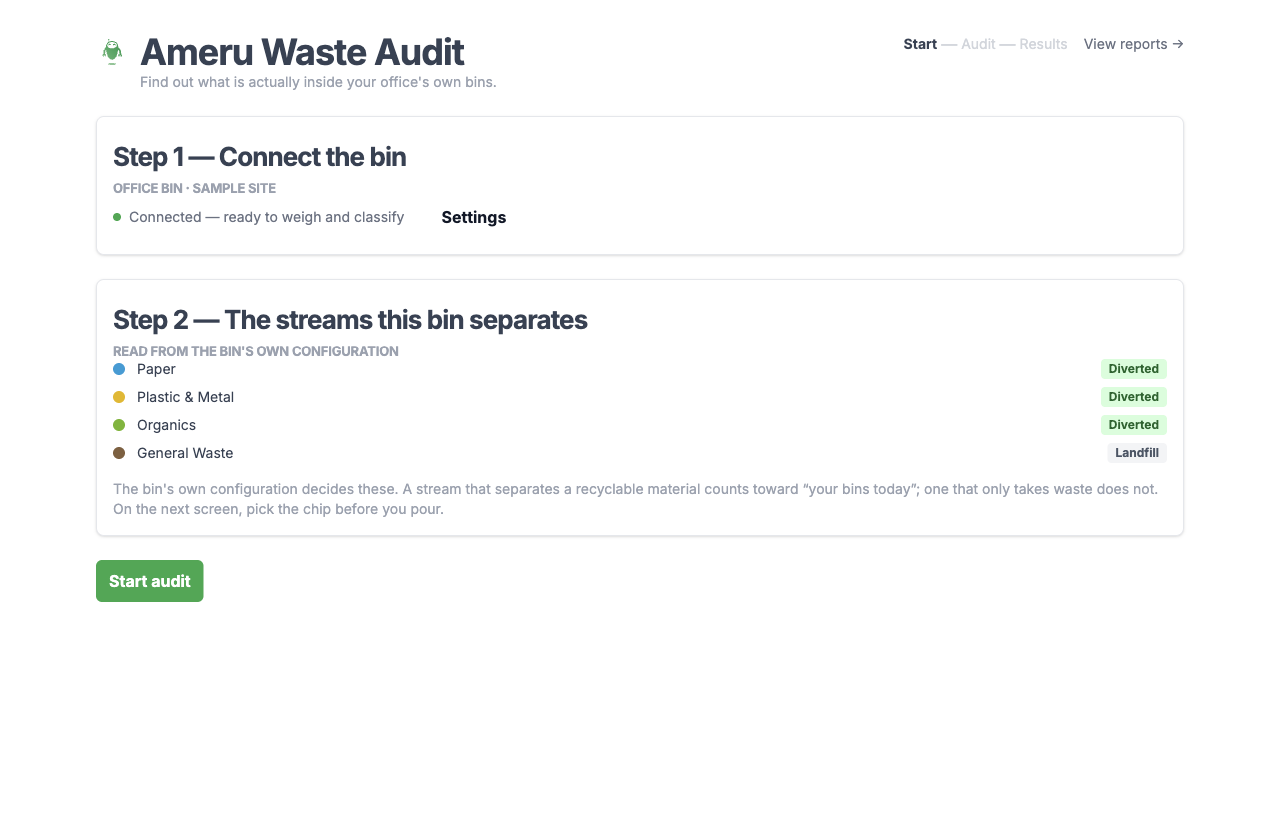
The streams come off the bin itself
The app pulls the stream list straight from your bin's own configuration over the network, built from the compartments it actually has. If your bin separates Paper, Plastic & Metal, Organics and General Waste, that is exactly the list you audit, because it is exactly the list your site sorts into. The numbers always match the system you actually run.
Connect, and go
Type the bin's address into Settings and press Connect, and the app reaches out right away. It saves the address once the bin confirms itself by sending back its own configuration, so you always know you are pointed at a real bin. If the connection ever drops, the app reconnects on its own.
One item at a time
Pick the stream you are pouring into, feed items in, and switch streams whenever you move to the next one, in whatever order suits you. If you mis-dispose a batch, Undo last item walks the whole thing back out, one item at a time.

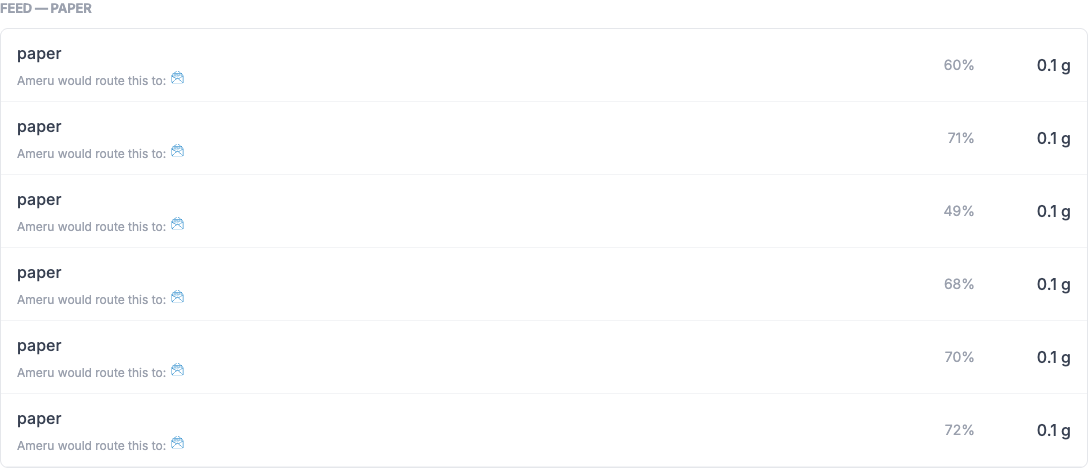
Every item is weighed and classified as it lands, with the bin's confidence shown alongside.
📊 What You Learn
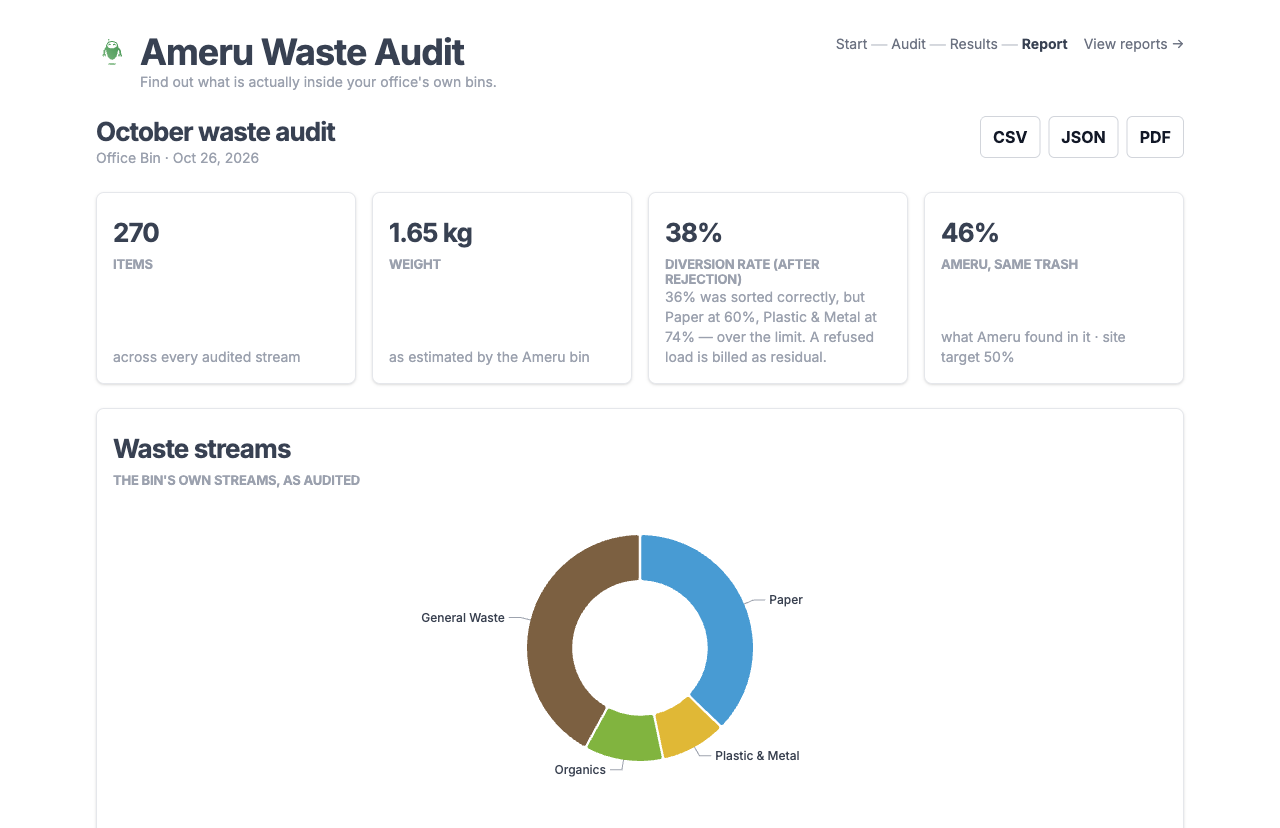
When the audit is finished, the app prints what was really in the waste. The numbers on this page are from a real audit of a real customer's waste: 270 items and 1.65 kg of office waste, weighed and classified by an actual Ameru bin. The site's identity, its bin and its stream names have been replaced, so the page shows what the app finds without saying whose waste it was.

The diversion rate is the share of the waste that ended up recycled or composted rather than landfilled. The app reports it two ways, side by side:
Your bins, after rejection
What your own sorting gets credited for once the hauler has judged each load. A load over its contamination limit is refused whole and billed as residual, so none of that stream's weight counts as diverted, not even the part that was sorted correctly.
Ameru, same trash
What the bin's own classification found in that exact batch. An item counts only if the bin's current layout has a compartment that can actually separate that material.
Both sides cover the same material on the same afternoon, which is what makes the difference between them meaningful. In the audit pictured above, the bin found 46% where the office's own sorting was credited with 38%, an eight-point gap, on 270 items and 1.65 kilograms.
The app also keeps the raw figure from before the hauler has had a say, and the export carries it, so you can see the sorting you did as well as the sorting you got paid for.
Where the sorting actually fails
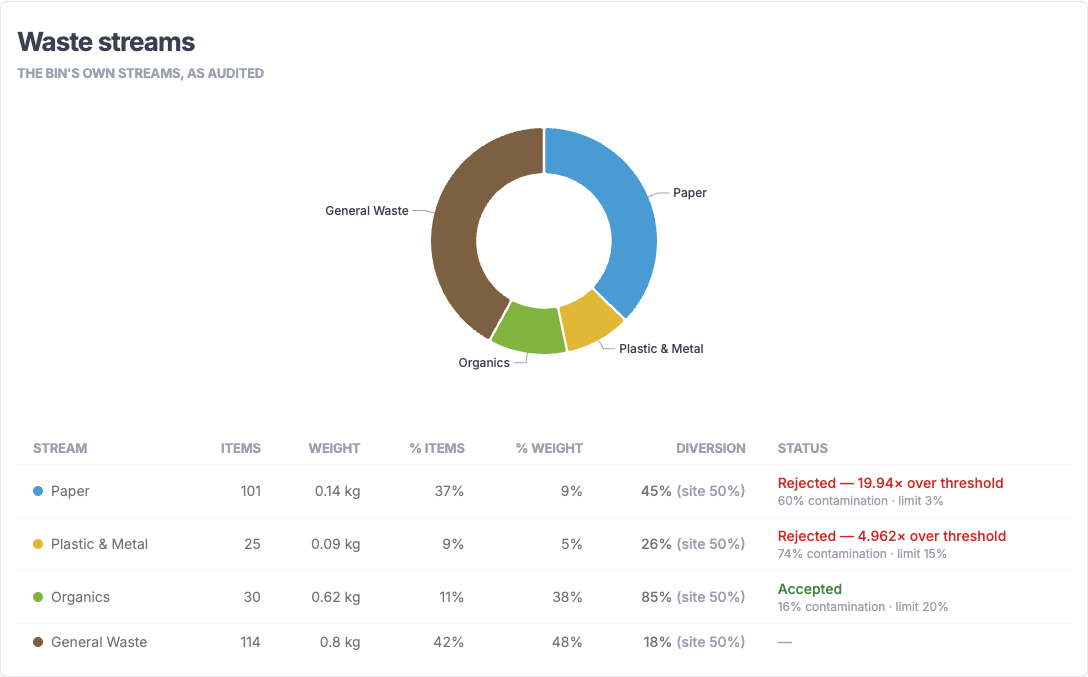
The Waste streams card breaks the batch down stream by stream, with each stream's contamination measured against the limit your hauler has posted for it. A stream over the limit is flagged as rejected, and its weight drops out of the total instead of being trimmed.
Here, Paper and Plastic & Metal were both refused. Paper came in at 60% contamination against a 3% limit. Organics, at 16%, stayed under its limit and was accepted whole.
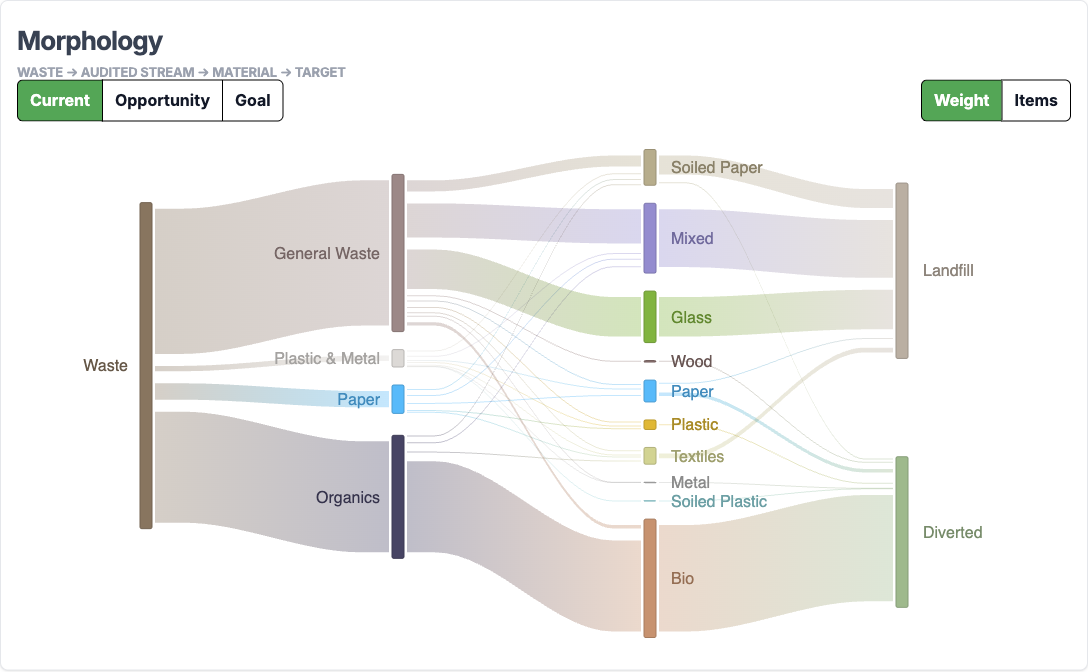
What was in it, and where it should have gone
The Morphology view traces the waste from the stream it was poured into, through the material it turned out to be, to the target it could have reached. It is the difference between "the recycling bin was wrong" and "the recycling bin was wrong about the same six things every week".
💰 What item-level data is worth
Most offices only ever see one number about their waste: the total on the hauler's invoice. That number says how much money left the account. It does not say why the bill went up, which shift broke the sorting discipline, or how much usable stock got thrown out by mistake.
An audit that records the material, the object, the condition and the weight of every single item turns that blind monthly total into something you can act on:
- Contamination, caught at the source. A hauler's surcharge is charged against the whole load, as one number. The stream-by-stream breakdown shows which stream pushed it over the limit, so the fix can be aimed at that stream instead of the whole building.
- Procurement leakage, visible. Unopened inventory, scrapped components and excess vendor packaging show up the same way everything else does — as items, with a material and a weight. A pattern that repeats across audits is a conversation with a supplier, not a guess.
- Hauler contracts, sized to what's actually there. A pickup scheduled for a container that never fills is still a paid pickup. If you want to renegotiate the schedule, start from weight and volume you measured directly, not weight and volume you assumed.
- The clipboard, retired for good. The audit replaces the day a person spends standing in the loading area with a clipboard, and the data it produces keeps paying off afterwards, for the next question as well as this one.
🗂 Reports and exports
Every finished audit is saved on the machine automatically — there is no save button, and nothing to remember to click. The reports table keeps the runs side by side, with what your bins were credited for, what Ameru found in the same waste, and the improvement between them.
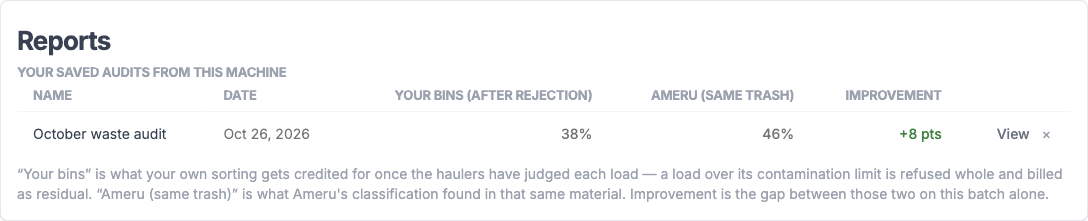
Each run exports to CSV, JSON or PDF. The PDF is a self-contained document with the stream-by-stream table and every item, ready to send to whoever signs off on the waste contract.
🔒 Where the Data Goes
The audit data stays on your own machine. The app runs on your own network and talks to your bin directly, and nothing it produces leaves that network.
If you are already on Ameru Cloud, you can add your organisation link and the app will also compare the batch against your organisation's real historical rate. That comparison is optional: the audit works fully with the Cloud fields left blank.
One thing to know before you start: the accuracy of the audit comes from you matching each load to the right stream as you pour. That's why the current-stream indicator on the audit screen is deliberately oversized, and why Undo last item is there whenever you need to correct a mis-pour.
✅ Get It
Ready to find out what is really in your bins?
👉 Contact the Ameru sales team to get the installer (Mac or Windows), or email us directly at sales@ameru.ai.
Already running Ameru bins? The numbers this produces line up with what your monthly analytics report is telling you. You can see how that works at Heathrow in the Compass Centre case study.